Pre-Upgrade Checks
Before upgrading the Traceable Platform, complete the following pre-checks to ensure a smooth upgrade process.
Image Availability
Verify that the images required for the target version are available in the production artifactory.
Note: If you are using the Traceable repository, you can skip this step.
Verification Steps
- Check the artifactory for the target version images
- Ensure all required images are present and accessible
- Verify image pull credentials are valid
Workload Health Check
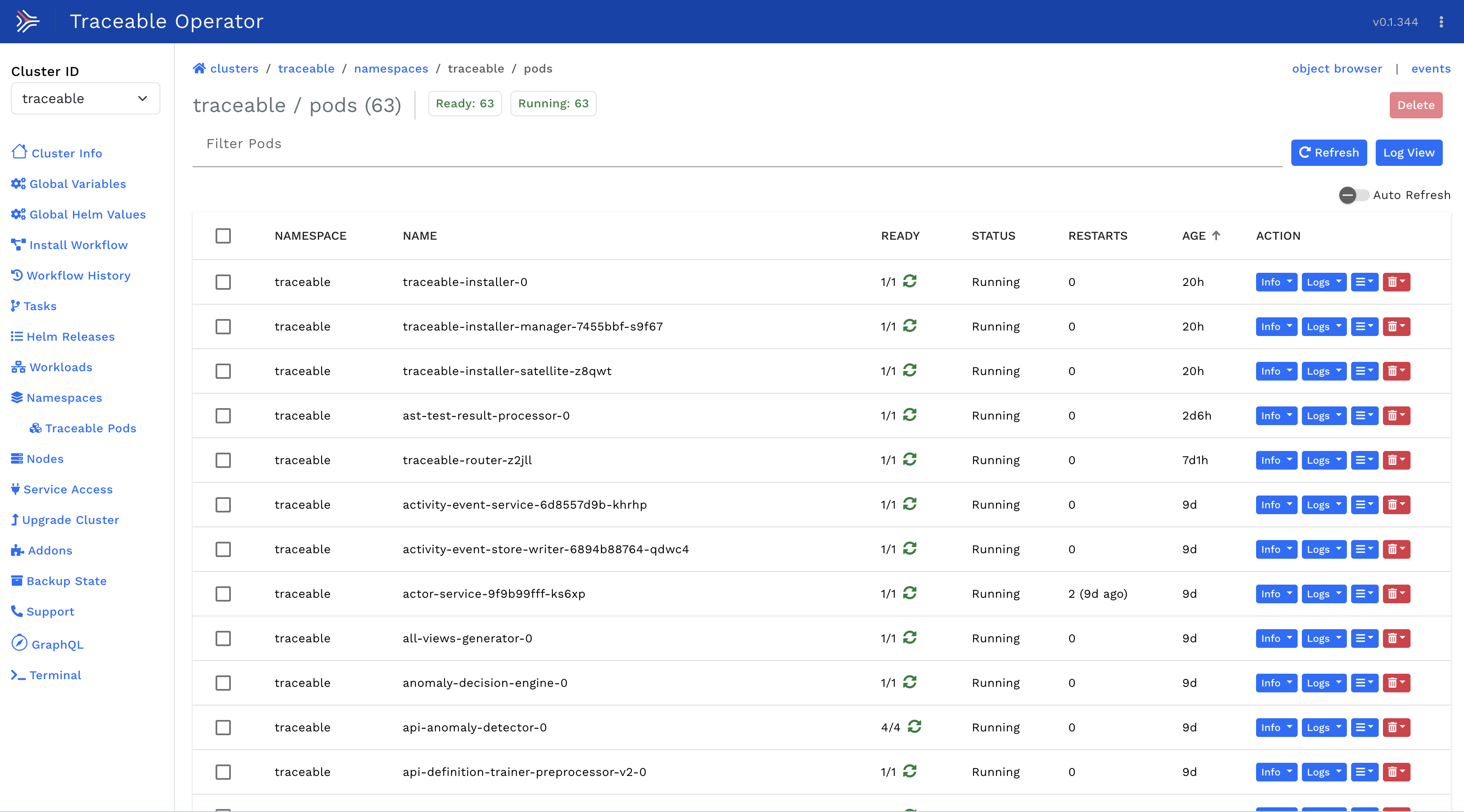
Check the status of all workloads to ensure all pods are up and running.
Verification Steps
- Run the following command to check pod status:
-
Verify all pods show
Runningstatus and are ready (e.g.,1/1,2/2) -
Check for any pods in error states:
Expected Result
All workloads should be healthy with no pods in error states.
If Issues Found
If you see any workload's status as unhealthy, reach out to the Traceable team to assist you with the issue before proceeding with the upgrade.
Example of healthy workloads:
Disk Space Validation
In the case of a single node deployment, ensure there is an ample amount of free disk space to avoid disk pressure during the upgrade.
Requirements
- Usage percentage: Should be ~50% or less
- Free disk space: At least ~50 GB on the mount point where Kubernetes is deployed
Verification Steps
Check disk usage on the node:
Focus on the mount points:
/var/lib/kubelet/var/lib/containerd/var/openebs(if using OpenEBS)
Example Output
In this example:
- Total: 200GB
- Used: 90GB (45%)
- Available: 100GB ✓ (meets requirement)
If Insufficient Space
If disk space is insufficient:
- Clean up unused container images:
crictl rmi --prune - Remove old logs
- Consider expanding the disk before proceeding
Data Flow Verification
Verify that the platform is actively receiving and processing data.
Verification Steps
- Log in to the Traceable UI
- Navigate to the spans/traces view
- Check if spans are coming in for the last 15 minutes
Expected Result
You should see active span data flowing into the platform within the last 15 minutes.
If No Data Flow
If no spans are visible:
- Check agent connectivity
- Verify network connectivity between agents and platform
- Review agent logs for errors
- Contact Traceable support before proceeding with upgrade
Pre-Upgrade Checklist
Before proceeding to the upgrade, ensure all items are checked:
- Images for target version are available in artifactory
- All pods are in
Runningstate with no errors - Disk usage is below 50% with at least 50GB free
- Spans are flowing into the platform (last 15 minutes)
- Backup of installer state is taken (recommended)
- Upgrade maintenance window is scheduled
- Rollback plan is prepared
Next Steps
Once all pre-checks are complete, proceed to Upgrading the Platform.
Support
If any pre-checks fail or you need assistance, contact: support@harness.io