Traceable Platform - AWS EKS Cluster
Architecture
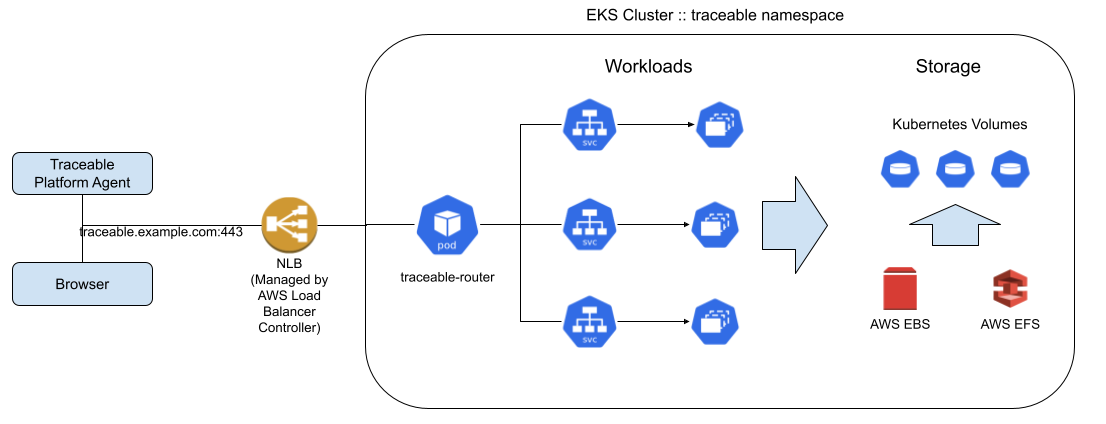
Pre-requisites
EKS Cluster
The EKS cluster must be created with the correct VPC configuration, subnets and managed node pool, security groups, IAM roles and policies.
EKS Addons
2.1 Core Addons
These are the core addons that are essential for the cluster. They are most likely installed by default when the cluster is created. If not installed, then install them separately
- VPC
- Core DNS
- Kube Proxy
- EKS Pod Identity Agent (Optional. Skip this if IRSA is used)
2.2 Required Addons by Traceable Platform
The following addons are required by traceable for Storage and Traffic Routing
- aws-ebs-csi-driver : Required for provisioning EBS volumes
- aws-efs-csi-driver : Required for provisioning EFS volumes
- aws-load-balancer-controller : Required for provisioning Load Balancer
- csi-snapshot-controller: ( Optional) for creating EBS volume snapshots for backup.
EFS Filesystem
An EFS File system must be created and configured. The EFS Addons must be configured to use this EFS File System https://docs.aws.amazon.com/eks/latest/userguide/efs-csi.html
DNS
The dedicated DNS must be set up for a traceable platform.
A dedicated DNS name must be available for the Traceable Platform. This DNS is used for:
- Agent (TPA) traffic to the platform
- UI access
- Internal service communication (e.g.,
iam-v2connecting to the platform)
DNS Resolution Requirements
The DNS must be resolvable from:
- User machines - For accessing the platform UI
- Kubernetes cluster - Services running inside the cluster must be able to connect to the platform using the DNS name
Loadbalancer / Traffic Routing
Traceable will create a Service of Type LoadBalancer, and the AWS Load Balancer Controller will provision a NLB. The DNS must be mapped to that IP / DNS.
TLS Certificates
The TLS Certificates must be generated externally or using ACM.
Note: On EKS with ACM the certificate is terminated at the NLB, so the SAN must include both the DNS name and the IP.
Overview
The Ingress-Nginx Controller will terminate TLS within the cluster. The Loadbalancer / VIP must be configured as a TLS passthrough.
Certificate Requirements
The TLS certificates in PEM format must be generated for the given DNS. The following must be available in the PEM format:
- Private key
- Server certificate (must include intermediate certs and root cert in the same file. The order of the certs in the file must be server cert should be first, followed by intermediate certs with the root cert at last)
- Root certificate
Default Behavior
The installer will autogenerate the self-signed TLS certs for the given DNS value by default.
Providing Custom TLS Certificates
If you wish to provide a TLS cert, the following options can be used:
--ti-set-file cluster.tfi.private_key="</path/to/tls_private_key.pem>" \
--ti-set-file cluster.tfi.tls_cert="</path/to/tls_cert.crt>" \
--ti-set-file cluster.tfi.root_ca_cert="</path/to/root_ca.crt>"
Important Notes
- The server certificate provided needs to have a Subject Alternative Name (SAN) with the DNS name
- CN (Common Name) is deprecated and UI would be inaccessible without a valid SAN in the certificate
- The passphrase must NOT be set on the TLS key files. i.e Make sure that the file does NOT contain the text "ENCRYPTED" as shown
-----BEGIN ENCRYPTED PRIVATE KEY-----
Docker Registry
Kubernetes cluster needs a Docker registry for managing and distributing container images used to run applications in the cluster.
Scenario 1: K8s Nodes can access Traceable Registry
If K8s Nodes can pull the images from the traceable registry at Harness Registry, then no further actions are required w.r.t docker registry.
Scenario 2: K8s Nodes cannot access Traceable Registry
The traceable platform docker images must be transferred to an internal docker registry in the customer's environment.
Option 1: Create a Remote / Mirror registry
Create a mirror registry at the customer's docker registry to pull the images from Traceable's publicly docker registry.
Option 2: Transfer the container images
Traceable provides several script-based options to copy the container images from the traceable registry to the customer's internal registry.
Requirements for Traceable Platform Install
The following are required for traceable platform install:
- Credentials to pull the images from the internal registry
- Connectivity from K8s nodes to the internal docker registry
EKS-specific: The artifacts will be downloaded from
downloads-onprem.traceable.ai.
Storage Class
These following storage classes must be created in the cluster
8.1 EBS Storage class
apiVersion: storage.k8s.io/v1
kind: StorageClass
metadata:
  name: ebs-sc
provisioner: ebs.csi.aws.com
volumeBindingMode: WaitForFirstConsumer
parameters:
  type: gp3
  iops: "3000"
  throughput: "125"
8.2 EFS Storage class
- Create a file named
efs-sc.yamlwith the following content
apiVersion: storage.k8s.io/v1
kind: StorageClass
metadata:
  name: efs-sc
provisioner: efs.csi.aws.com
parameters:
  provisioningMode: efs-ap
  fileSystemId: fs-XXXXXXX # The EFS File System ID from Step #3
  directoryPerms: "775"
  basePath: "/traceable"
  gid: "65532"
  uid: "65532"
Traceable Platform Installation
Create a file named ti-values.yaml
Update the values commented as UPDATE in the file as per the environment
cluster:
  airgapEnabled: true
  # Name should contain only lowercase letters & numbers only [4-10 chars]
  name: traceable
  version: 1.40.1
  profile: medium
  imageRegistryHost: docker.example.org/relative-path #UPDATE with the relative path to the docker registry
  imageRegistryPathPrefix: "" # Leave this blank
  tfi:
    dns: example.com #UPDATE
    userEmail: traceable@example.com #UPDATE - bootstrap user for teh platform
    userPassword: myPassword #UPDATE - bootstrap password for the platform
    storageClass: ebs-sc
    sharedPvStorageClass: efs-sc
    useSelfSignedCerts: true
  triggerUpgrade: false
  triggerInstall: false
  generateTlsCerts: true
  workflows:
    - name: install
      items:
        - name: upload_install_tls_certs
          initCfg:
            runOnInit: true
        - name: traceable-router
          create: true
          initCfg:
            runOnInit: true
  helmValues:
    traceable-router:
      httpsEnabled: true
      httpEnabled: false
      service:
        type: LoadBalancer
        primaryPortDef:
          port: 443
          targetPort: https
        secondaryPortDef:
          port: 0
        annotations:
          service.beta.kubernetes.io/aws-load-balancer-backend-protocol: ssl
          service.beta.kubernetes.io/aws-load-balancer-ssl-ports: "443"
          service.beta.kubernetes.io/aws-load-balancer-scheme: "internet-facing"
          service.beta.kubernetes.io/aws-load-balancer-cross-zone-load-balancing-enabled: "true"
          service.beta.kubernetes.io/aws-load-balancer-ssl-cert: "arn:aws:acm:REGION:ACCOUNT_ID:certificate/CERT_ID"  #UPDATE - ACM Cert ARN
          service.beta.kubernetes.io/aws-load-balancer-type: external
          service.beta.kubernetes.io/aws-load-balancer-nlb-target-type: ip
initCluster: true
mountWorkflow: true
ingress:
  enabled: false
tiUsers:
  # $(echo -n myPassword | shasum -a 256)
  traceable@example.com: 76549b827ec46e705fd03831813fa52172338f0dfcbd711ed44b81a96dac51c6  #UPDATE - EMAIL & Password SHA-512-Hash for Operator User